Actionable Chatbots with Liferay AI Hub: My Talk at the Liferay User Group Meetup, Ahmedabad

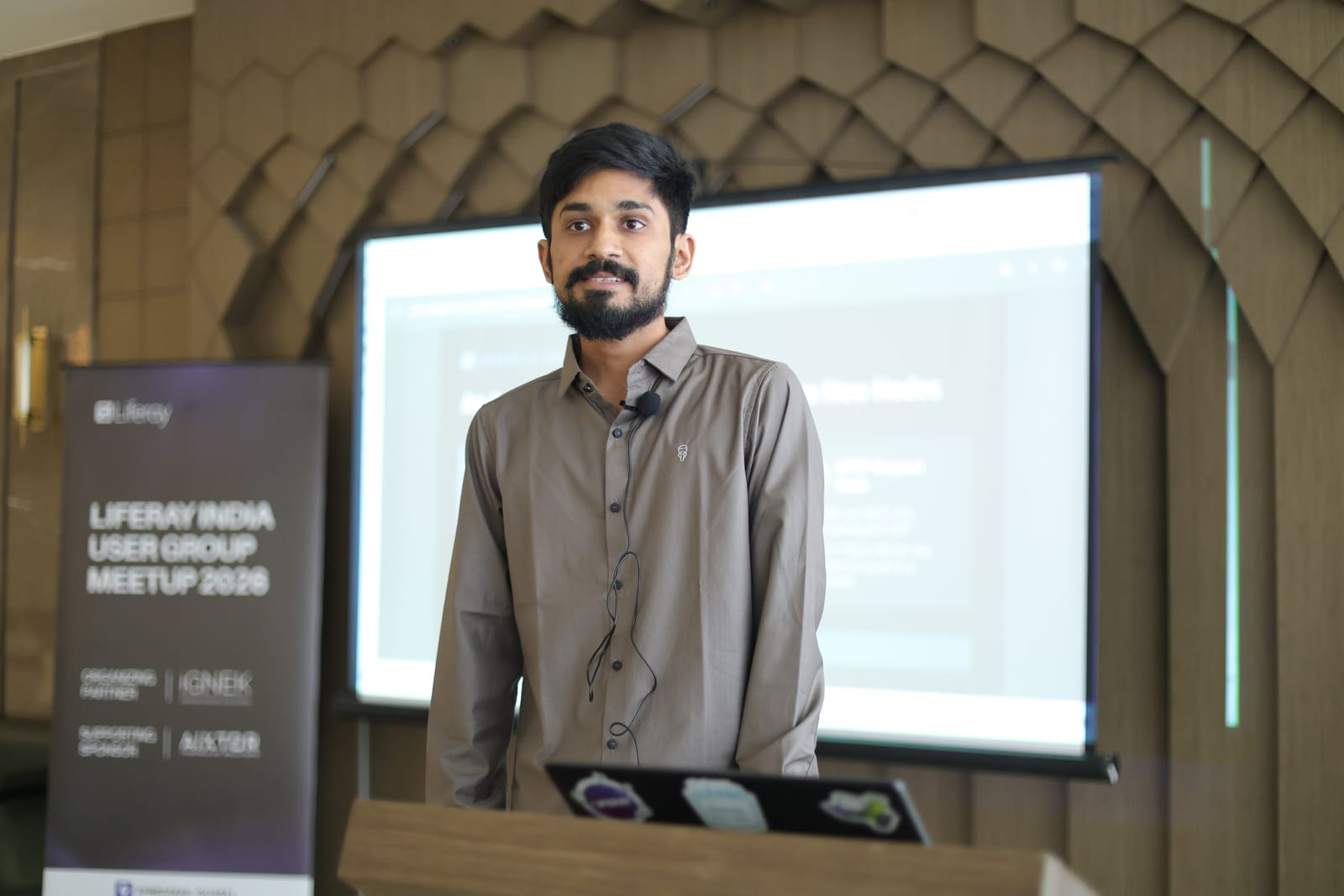
On 17 October 2026 I had the chance to speak at the Liferay India User Group Meetup 2026 in Ahmedabad. My slot came straight after the roadmap session, which had covered where AI in Liferay is heading, mostly around AI-powered content creation. I wanted to show the other half of that story: an agent that does real work on Liferay data today, using pieces most Liferay developers already know.
The talk was called "Actionable Chatbots with Liferay AI Hub: From Conversation to Execution". This post is the written version, with the parts I had to rush through in a 30-minute slot spelled out properly.
Chatbots answer. Agents do the work.
Most portal chatbots today explain the leave policy. They give everyone the same answer, and the conversation is where they stop. That's useful, but it's a search box with better manners.
An actionable chatbot looks up your actual leave request, raises a new one for you, and lets your manager approve it in the same chat. The difference isn't a smarter model. The difference is that the chatbot is wired to live Liferay data: it reads records, creates them and updates them, and Liferay's own permissions decide who may do which. That's the step from conversation to execution in the title.
An agent doesn't just talk. It decides, looks things up and acts, within limits you set. The rest of the talk was about how to build those limits so they hold.
An AI Hub agent is a Kaleo workflow with three new nodes
This was the slide that got the most nods in the room. Liferay AI Hub is a hosted service (in Beta at the time of the talk) that DXP connects out to. You invoke agents from the AI Assistant, from chatbots or through the API. But when you open an agent to see what it actually does, you land in the Workflow Designer you already know: same canvas, same Kaleo XML. AI Hub adds three node types:
- LLM node: a prompt in, text or JSON out. It reads and writes workflow variables, so one node's output becomes the next node's input.
- AI Decision node: the model picks the next transition. Branching without hard-coded rules.
- HTTP Request node: calls any REST API, including your own DXP. GET, POST and PATCH, with the response landing in a variable.
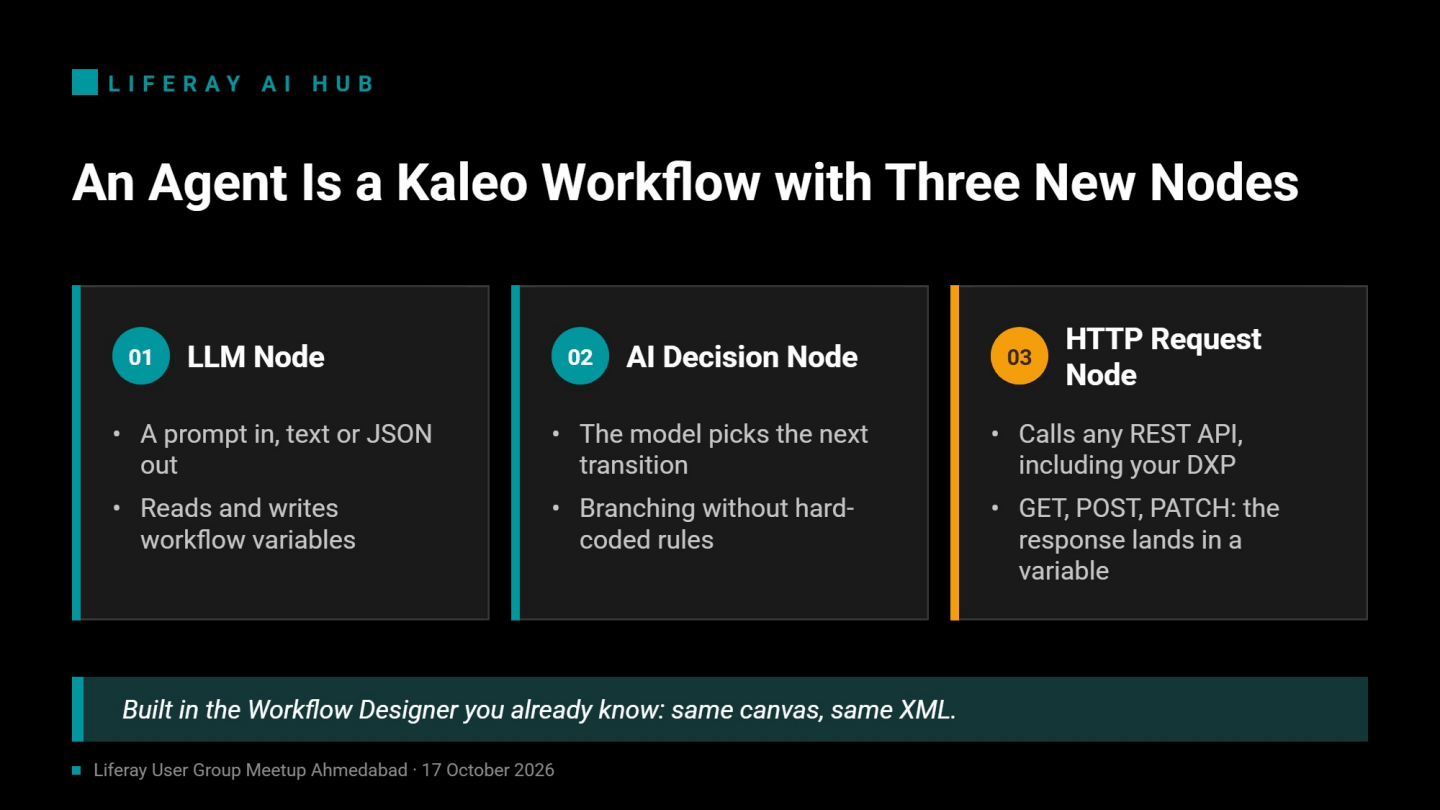
If you've built multi-stage approval workflows in Kaleo, you already know most of what's needed. The new skill is writing prompts that behave like functions: a narrow input, a narrow output, and nothing left for the model to improvise.
The demo: a Portal Assistant for leave, expenses and IT
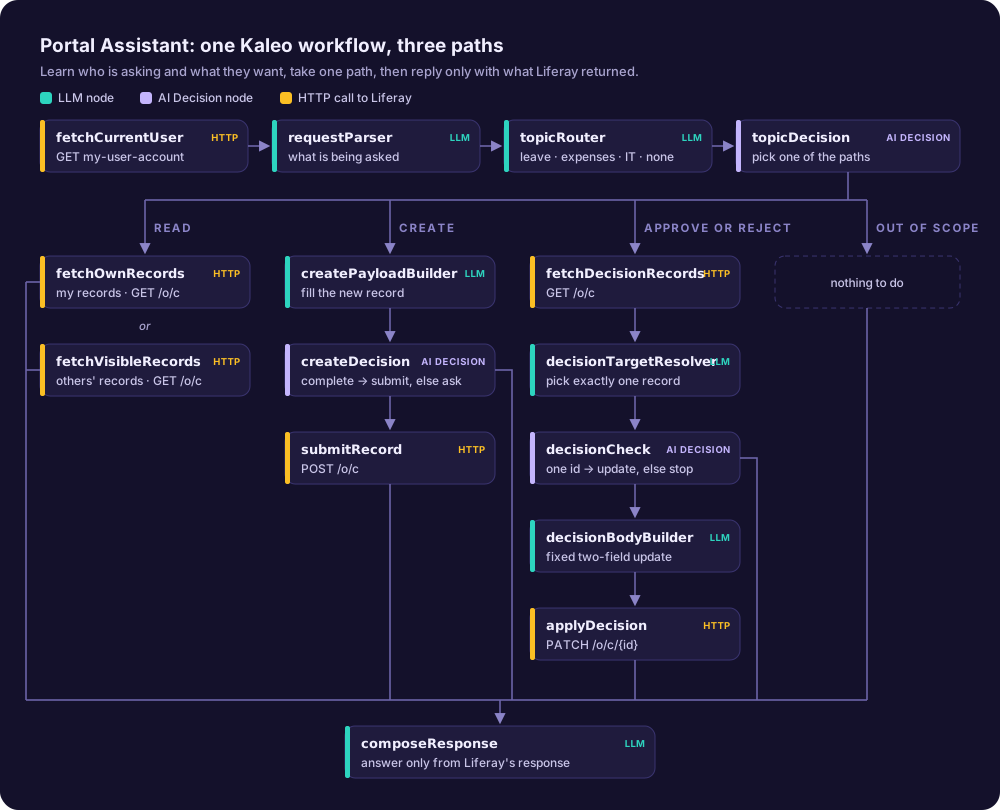
The agent I demoed is a Portal Assistant that answers questions about your own leave requests, expense claims and IT tickets, raises new ones, and lets a manager approve or reject them. It's a single workflow with 15 nodes: 6 LLM prompts, 3 AI decisions and 6 HTTP calls. Every question first learns who is asking and what they want, then takes one of three paths: read, create, or approve and reject. Every path ends in the same reply step, which only reports what Liferay returned.
The live demo walked a single leave request from creation to approval, switching between two users:
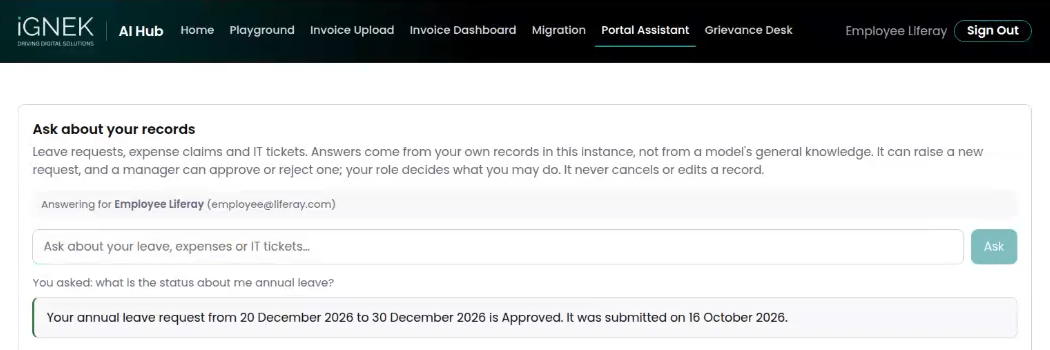
- Employee: "What happened to my leave request for September 25?" The agent reads live data and replies with the status, the submission date and who the request is waiting on.
- Employee: "Book annual leave for 12 and 13 November." The agent creates a record with the status Pending Manager Approval, waiting on the line manager. If a required detail is missing, the createDecision node refuses to submit half a record and the reply asks for it instead.
- Employee: "Approve my leave for 12 November." Refused. Nobody approves their own request, and an Employee role can't update these records anyway. Nothing changes.
- Manager, in a private window: "Approve the employee's leave for 12 November." The agent finds the one matching record that's waiting for approval and sends a PATCH that changes exactly two fields. Liferay checks that the manager may update it.
- Employee again: "What happened to my leave for 12 November?" The same record now reads Approved.

Four pieces, all standard Liferay
The architecture slide was deliberately boring:
React custom element → AI Hub agent → Liferay Object API → Objects + RolesThe page is a React 18 and TypeScript client extension. The data lives in three Liferay Objects (leave, expenses and IT tickets), and a small module creates the Employee, Manager and HR roles. The agent calls the standard /o/c object endpoints: GET to read, POST to create, PATCH to approve or reject. There's no custom API in between. The only new piece is the agent itself.
How the page talks to AI Hub
Running an agent from the browser takes three calls, not one, and the results don't come back from the call that starts the agent:
1. POST {portal}/o/ai-hub-cell/v1.0/authorization-tokens
     -> accessToken, userToken, serviceURL (the AI Hub host is told to you)

2. GET  {serviceURL}/o/ai-hub/v1.0/chats/subscribe      (text/event-stream)
     -> first event carries the sseEventSinkKey

3. POST {serviceURL}/o/ai-hub/v1.0/agent-instances
     Authorization: Bearer <accessToken>
     liferay-ai-hub-cell-on-behalf-of: <userToken>
     { agentDefinitionExternalReferenceCode, context, sseEventSinkKey }

4. Read the stream opened in step 2: one event per node as it finishesResults arrive as server-sent events, the same streaming pattern I wrote about in real-time updates in Liferay with Server-Sent Events. Three gotchas cost me time here:
- Open the stream before starting the run. If you start the agent first, the early node events are gone before you're listening.
- Take the AI Hub host from the token response instead of hard-coding it.
- Send today's date in the viewer's own timezone. A UTC date is a day out either side of midnight, and "tomorrow" resolves to the wrong day.
Humans stay in control: permissions and approvals, not prompts
This is the part I care about most. An assistant that invents a status is worse than having none, because a wrong answer reads exactly like a true one. So the workflow is built so that the model never has the final say on anything that matters.
| Principle | How the workflow enforces it |
|---|---|
| Grounded answers | Every fact in the reply comes from Liferay's response. Nothing found means "I can't see any". The reply may say "approved" only when the PATCH came back with the updated record. |
| Narrow routing | topicRouter can output only leave, expenses, IT or none. That value goes into a URL, so nothing the user types can reach the path. |
| Narrow actions | The record to approve must come from Liferay's own rows: exactly one, waiting for a manager, and not the asker's own. Otherwise the run stops. |
| Fixed update body | decisionBodyBuilder copies the update from a fixed table with two fields: status and who it's waiting on. The model can't invent a field. |
| People approve | HTTP nodes call Liferay as the signed-in user, so roles decide who may update a record. An Employee's PATCH fails, whatever the prompt says. |
None of this is new Liferay. It's the permission framework doing what it has always done, with the agent treated as just another client that has to ask.
What's still POC-grade
I was honest about this in the room and I'll repeat it here. The starting status of a new record is set by the agent, not enforced by the server. A crafted request could create a record that starts out Approved. The fix belongs in Liferay, as server-side validation or object actions on create, not in the prompt. A rule that only exists in a prompt isn't enforced. It's a request.
Lessons that cost me time
- AI Hub calls back into your DXP, so DXP needs a public URL. localhost means AI Hub's own container. Use a proper tunnel or a hosted instance.
- The free ngrok tier doesn't work. Its browser warning page intercepts the callback, and everything looks healthy until the agent fails.
- Send every variable your URL templates need. None of them are filled in for you, and an unbound one produces a URL with no host that fails silently.
- Import the workflow under the agent's own UUID. A workflow saved under any other name isn't the one the agent opens, so imports seem to succeed and then quietly revert.
- HTTP nodes emit no stream events. To debug one, add a throwaway LLM node after it that just echoes the response.
- A null in a PATCH body erases the field. The fixed update table has no nulls, and an unknown decision sends an empty object.
- Objects already have a system status field, so the custom field is called requestStatus.
Where this pattern goes
Adding a new topic doesn't change the shape of the workflow: it's one new Object and one new line in the router. The read, create and approve paths all work on whatever the router resolves. Next steps for this bot are server-side rules for new records, notifying the manager when a request lands, and conversation memory.
The same page-to-agent contract sits behind the other agents I've built on AI Hub: a grievance management desk with department routing, email invoice intake with a review dashboard, and an agent that turns an existing website page into a draft Liferay page.
If you take one thing from the talk, it's that the model is the least interesting part. The value is in the wiring to Liferay and the limits around it:
- Agents are Kaleo workflows.
- Ground every answer in live data.
- Let permissions enforce the rules.
- Keep people on the approve button.
Thank you
Thanks to IGNEK for organising the meetup, to Aixtor for supporting it, and to everyone who came along and stayed for the questions. If you're building something similar on Liferay AI Hub, or want to talk through a use case of your own, get in touch.